
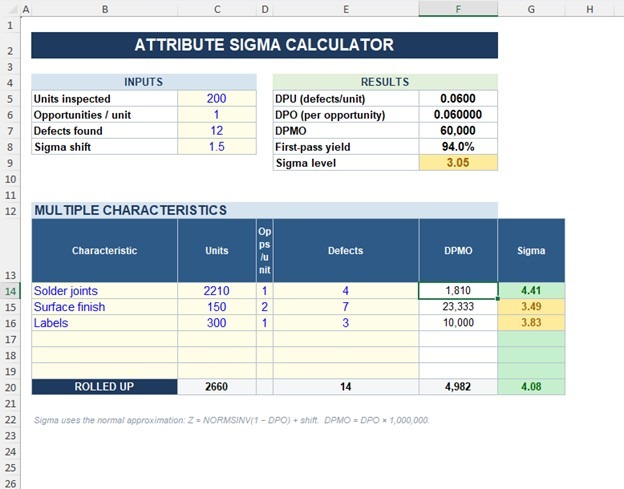
Attribute Sigma Calculator for Excel
Original price was: $12.00.$9.00Current price is: $9.00.
Turn pass/fail inspection data into process sigma in seconds. Enter units, opportunities and defects and the attribute sigma calculator returns DPU, DPMO, first-pass yield and sigma level — plus a multi-characteristic rollup.
✔ Single + multi-characteristic ✔ Adjustable 1.5σ shift ✔ Colour-coded results ✔ Instant .xlsx download
Description
Know your process sigma in seconds — straight from your defect data.
The Attribute Sigma Calculator turns simple pass/fail inspection counts into the numbers quality teams actually report: DPU, DPO, DPMO, first-pass yield and process sigma level. Enter three figures and every result updates instantly — no formulas to look up, no statistical tables.
What it does
- Converts units inspected, opportunities per unit and defects into DPU, DPO and DPMO
- Calculates process sigma with the standard 1.5-sigma long-term shift (adjustable)
- Reports first-pass yield alongside the sigma figure
- Rolls up multiple characteristics into a single combined sigma
- Colour-codes each result red/amber/green so status is obvious at a glance
What’s inside
- Calculator — single-characteristic block plus a multi-characteristic rollup table
- Instructions — plain-English method and definitions
Why use this attribute sigma calculator
Live formulas already wired in, blue input vs. black calculated cells, drop-down validation, and edge cases handled (zero defects, all-defective) so it never throws an error. It matches textbook results exactly — 12 defects in 200 units returns DPMO 60,000 and 3.05 sigma.
Who it’s for
Quality engineers, Six Sigma Green and Black Belts, and process-improvement teams measuring baseline sigma, tracking DPMO, or preparing capability reports.
What you get
Instant download of a single Microsoft Excel (.xlsx) file. Works in Excel 2016+ and Microsoft 365. Single-user license.six
Related products
-
Sale!
DFA/DFM Analysis Template for Excel
Original price was: $29.00.$19.00Current price is: $19.00. Add to cart -
Sale!

Supplier Evaluation Scorecard Bundle — 10 Excel Templates with Dashboards
Original price was: $69.99.$39.99Current price is: $39.99. Add to cart -
Sale!
Pugh Matrix Template for Excel and Google Sheets — Complete 5-Workbook Suite
Original price was: $49.99.$19.99Current price is: $19.99. Add to cart -
Sale!

Kaizen & Continuous Improvement Templates — 10 Excel Workbooks with Dashboards
Original price was: $49.99.$29.99Current price is: $29.99. Add to cart