
FMEA Template for Excel (Failure Mode & Effects Analysis)
Original price was: $19.00.$15.00Current price is: $15.00.
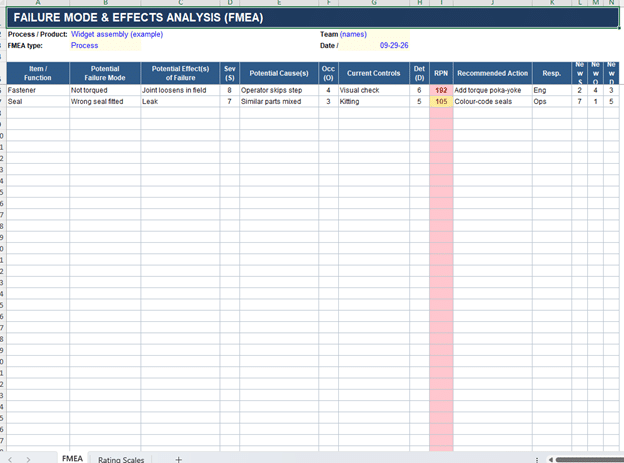
A ready-to-use FMEA worksheet for Excel. Rate severity, occurrence and detection from the built-in 1–10 scales, and the sheet works out the RPN and flags your high-risk failure modes for you.
- Process or design FMEA, all the standard columns
- Automatic RPN scoring with high scores highlighted
- Re-score columns to show risk dropping after actions
- Rating-scales tab so the whole team scores the same way
- Instant Excel (.xlsx) download
Description
Running an FMEA by hand gets tedious fast. You’re recalculating RPNs every time a score changes, trying to keep the rating scales consistent across the team, and losing track of which failure modes still need action. This template takes care of the mechanical parts so your time goes into the analysis instead of the spreadsheet.
Enter each failure mode, then score Severity, Occurrence and Detection from the 1–10 drop-downs. The sheet calculates the Risk Priority Number (RPN = S × O × D) as you work and highlights the worst rows in red, so the failure modes that actually need attention rise to the top instead of getting buried.
What’s in it
- A process or design FMEA worksheet with the standard columns: item and function, potential failure mode, effects, causes, current controls, recommended action, and responsibility.
- Automatic RPN scoring, with high-risk rows flagged (red at 150 and above, amber from 80).
- A second set of Severity / Occurrence / Detection columns for re-scoring after your actions, so you can show the risk genuinely came down.
- A rating-scales tab with 1–10 anchors for S, O and D, so two people rating the same failure mode land in the same place.
Who it’s for
Quality and manufacturing engineers, Six Sigma practitioners, and anyone who has to produce a credible process or design FMEA — for a customer audit, a PPAP submission, an APQP launch, or simply to catch problems before they reach the field.
What you get
A single Excel file (.xlsx). Works in Excel 2016 and later and in Microsoft 365, on Windows or Mac. Buy it once and use it on as many projects as you need.
FAQ (put these in Yoast’s FAQ block so they generate schema)
Does this work for both process and design FMEAs?
Yes. The structure is the same for both — you just describe process steps or design functions in the item column. Use it for a PFMEA or a DFMEA.
How is the RPN calculated?
Severity × Occurrence × Detection, each rated 1 to 10, so the RPN ranges from 1 to 1000. The sheet does the multiplication for you and flags the high scores.
What RPN counts as “high”?
There’s no universal cutoff — it depends on your organisation’s risk criteria. The template flags 150 and above in red and 80 to 149 in amber as a sensible starting point, and you can change those thresholds to match your own standard.
Does it use the AIAG-VDA Action Priority method?
It uses the classic RPN approach, which is still the most widely used and what most teams and templates expect. If your customer specifically mandates the AIAG-VDA AP tables, you can adapt the columns to suit.
Which Excel versions does it work in?
Excel 2016, 2019 and 2021, and Microsoft 365, on both Windows and Mac.
Can I use it on more than one project?
Yes. It’s a reusable template — copy the file for each new analysis.
Related products
-
Sale!

350 Project Management Templates Bundle — Mega Excel Templates Bundle with Visual Dashboards
Original price was: $49.99.$29.00Current price is: $29.00. Add to cart -
Sale!

Kaizen & Continuous Improvement Templates — 10 Excel Workbooks with Dashboards
Original price was: $49.99.$29.99Current price is: $29.99. Add to cart -
Sale!

HACCP Compliance Toolkit — 50 Audit-Ready Checklists & Logs for Excel and Google Sheets
Original price was: $29.99.$14.99Current price is: $14.99. Add to cart -
Sale!

Supplier Evaluation Scorecard Bundle — 10 Excel Templates with Dashboards
Original price was: $69.99.$39.99Current price is: $39.99. Add to cart